INTEGRATIONS · GENESYS CLOUD CHAT
Genesys Bot Connector
Genesys Cloud calls HiveCFM as a text bot: once per customer message it POSTs to /api/v1/management/bot-connector/turn, and HiveCFM answers with the nextNext.jsReact framework used by HiveCFM Core. Handles routing, server rendering, and API routes in one bundle. survey question as chat text plus quick-reply buttons. Any HiveCFM survey can run this way; the Architect flow passes its surveyId.
This page has two parts. Quickstart gets a chat survey running and testable in about 20 minutes, HiveCFM side first. Reference is the code-verified contract for when something behaves unexpectedly.
Try it now without Genesys: the Bot Chat Tester sends exactly what Genesys sends. Or import the Postman collection.
Quickstart
Verified on dev.hivecfm.io on 14 Oct 2026 with survey cmv78mcnv004en201dumw7c4h (Zain Chat Bot Test, EN + AR) in environment cmt5pjft9000ikq01uokfllc8. English chat, Arabic chat, an invalid answer and an opt-out all completed through the API; a chat through a live Genesys messaging flow has not been run yet.
1. Create the survey
Surveys → New Survey → Link → Integration method API → Start from scratch. The bot ignores the survey type, so Link is fine; API marks the intent.
Build the questions you want in chat:
| Question type | In chat |
|---|---|
| Rating, NPS | number buttons |
| Single / Multi-Select | one button per option |
| Free text, Date, Address, Contact | customer types |
| Consent, Statement (CTA) | Yes/No or Continue |
| File Upload, Picture Selection, Cal, Matrix | skipped (isSupportedInChat) |
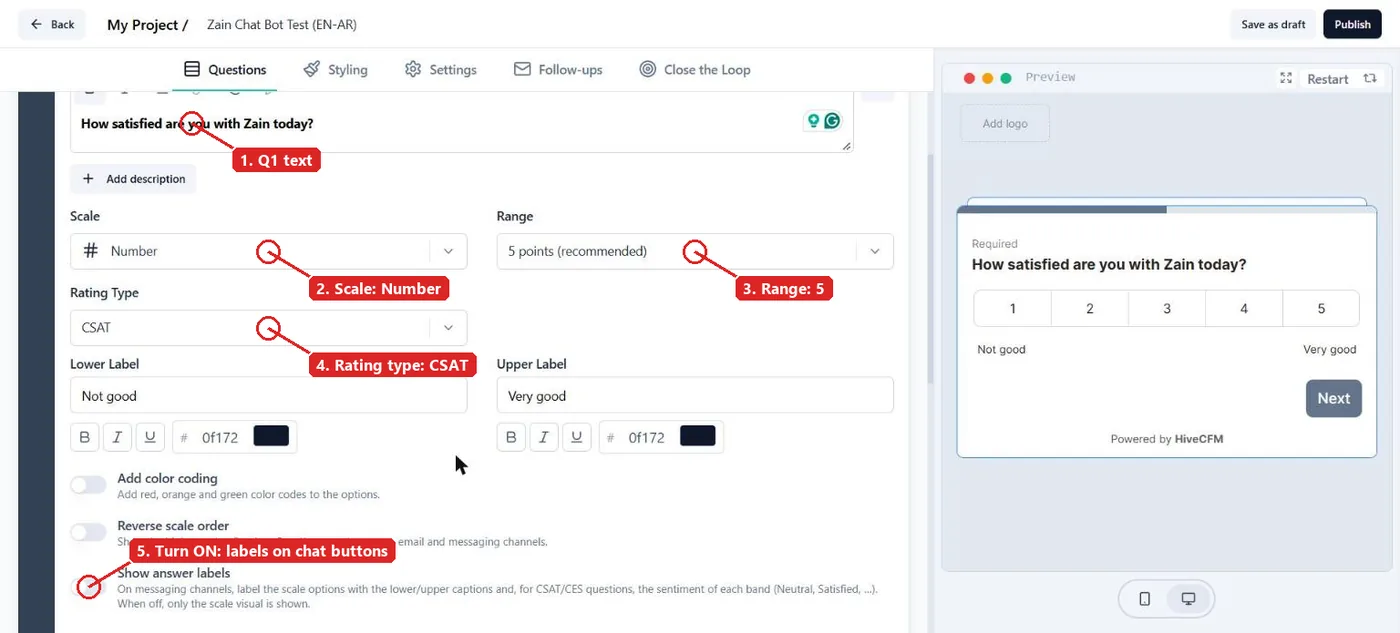
For ratings turn on Show answer labels, so buttons read 4 - Satisfied, not just 4. The ending card headline + description become the last chat message; turn its link button off.
2. Chat settings and Arabic
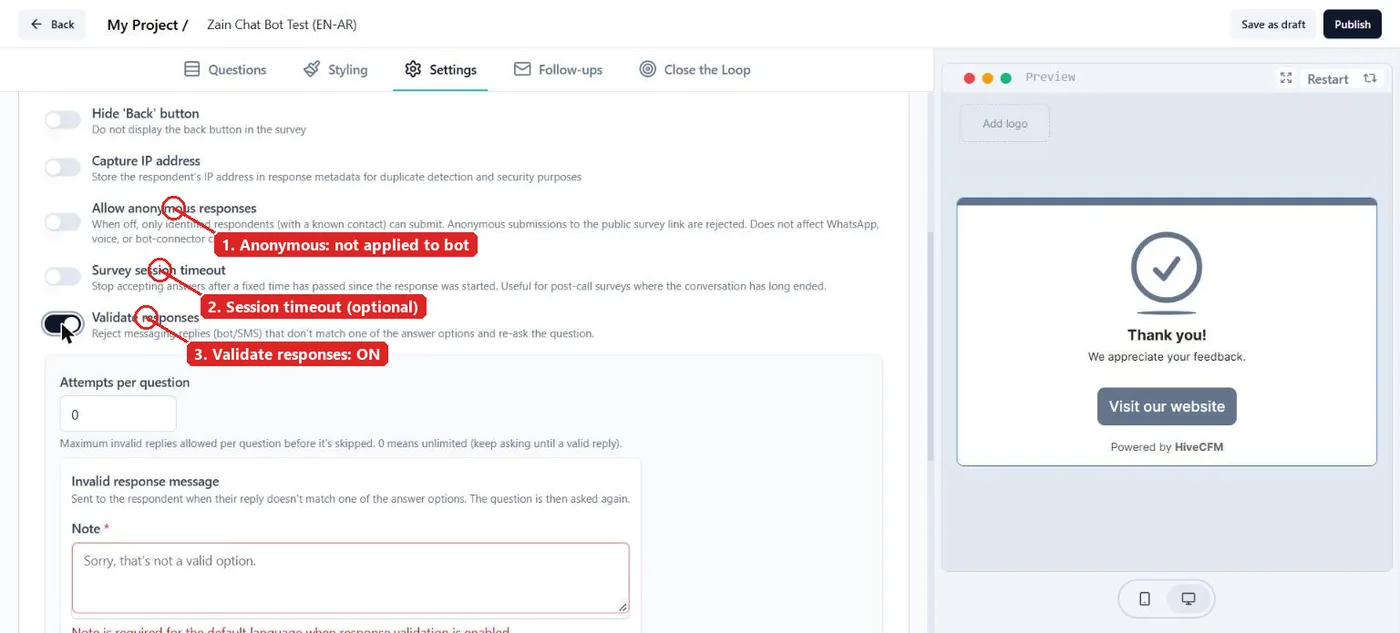
Settings → Response Options → Validate responses = On. A reply that matches no button gets the invalid-response message and the same question again; after Attempts per question the question is skipped with the max-attempts message.
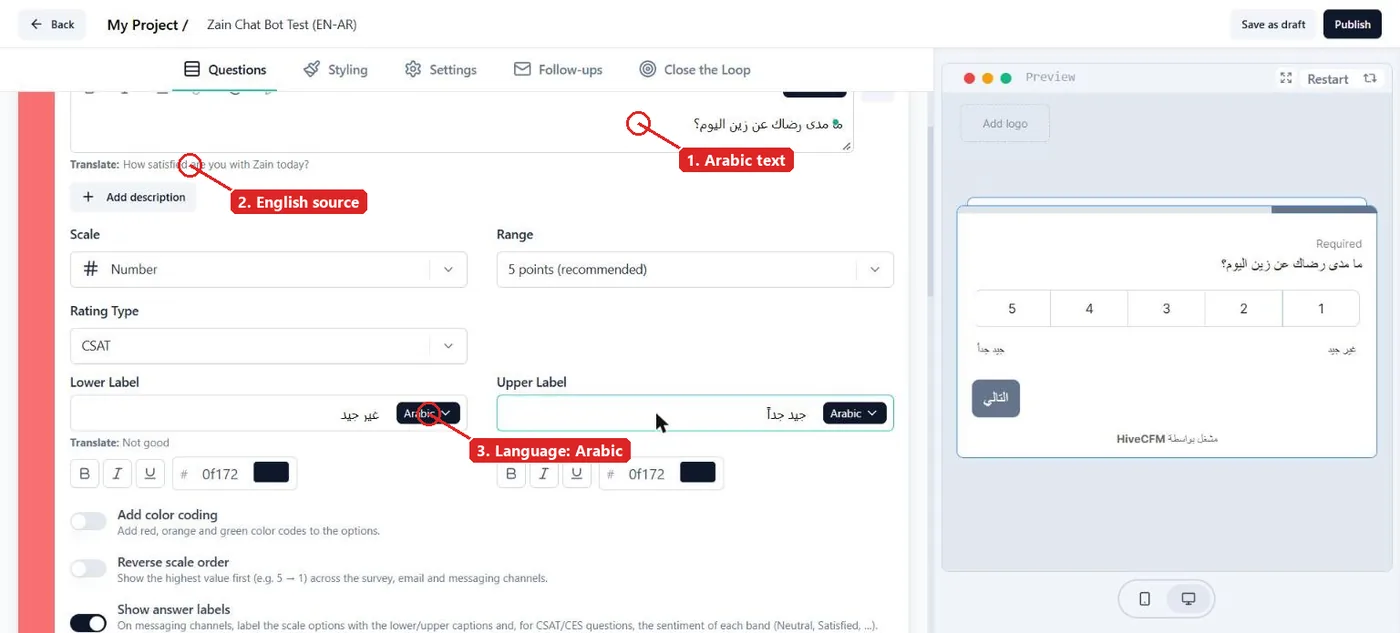
Questions → Multiple languages → English default, Arabic on → Edit Arabic translations. Translate every field, including the validation messages (each has its own language switch) and each block’s Button Label under Show Block settings. Publish is blocked while any Arabic field is empty, even ones chat never shows.
Genesys sends languageCode (en-US, ar-SA); HiveCFM uses the part before the dash.
3. Hidden fields for Genesys data
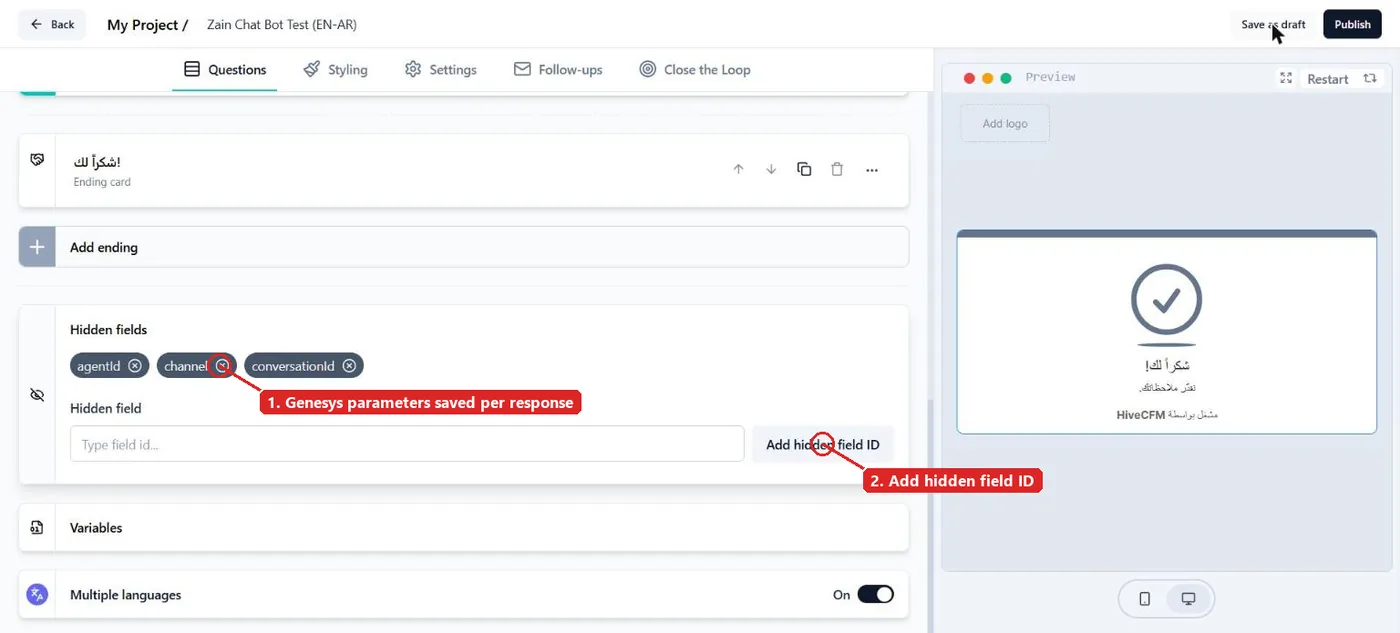
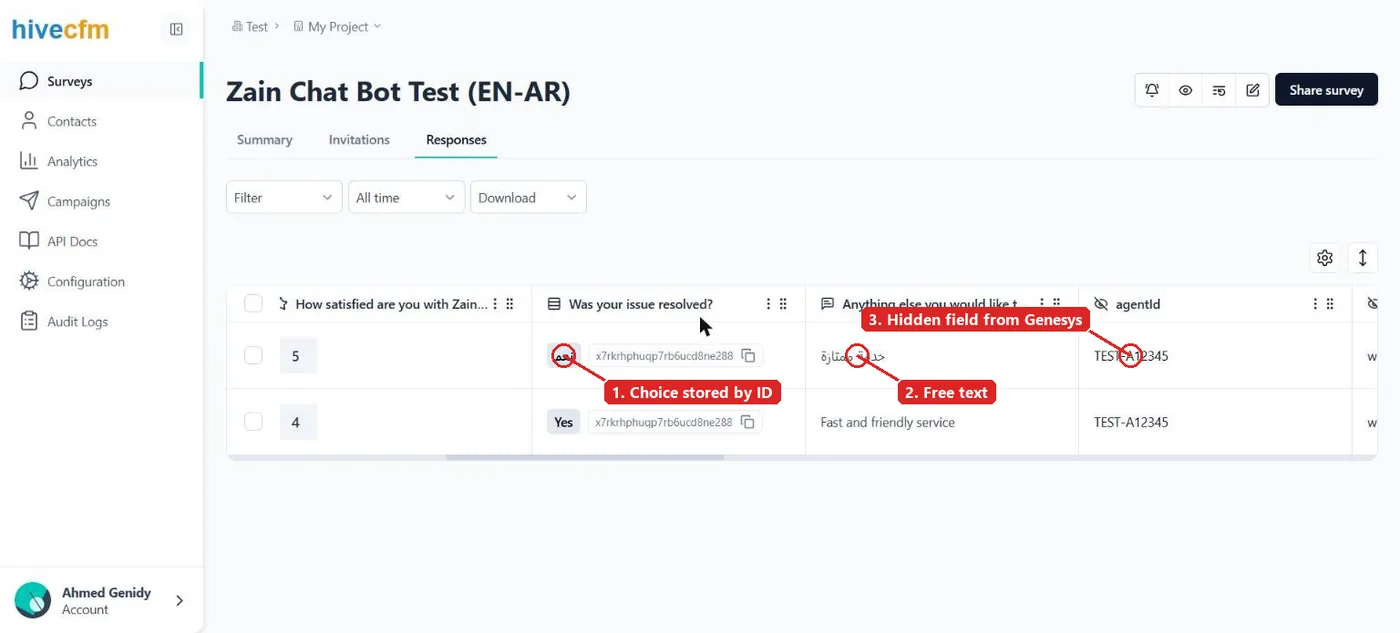
Every non-empty parameters.* value Genesys sends is stored on the response. Only the IDs you declare under Questions → Hidden fields appear in reports and exports.
Useful IDs: agentId, agentName, channel, conversationId, contactId (links to an existing contact), serviceCode, entityCode, interactionType, language.
4. Upsert the contact, then select the survey
Do these two calls first, before the bot is called. Upsert makes sure the customer exists and gives you the identifier to send; selection turns the context you already have (channel, language, interaction type) into the surveyId for the turn.
a. Upsert the contact. PUT /api/v2/management/contacts/upsert with a key that has write on the environment. It creates the contact when it is new and updates it when it exists. Send a stable customer identifier (the CIC or customer id) as userId.
b. Select the survey. POST /api/v1/management/survey/select-relevant-survey (a read-scoped key is enough; a write key also works). It is read-only: no response, invitation or link is created. 200 returns surveyId; 404 means no eligible survey — a configuration answer, not an error.
c. Start the bot with that surveyId, and the same userId value as parameters.contactId.
Pass the userId value you upserted, never the id the upsert returns. The bot accepts either to find the contact, but the response row is linked only through the userId attribute; a contact primary key leaves Response.contactId empty (see Contact resolution).
Selection parameters
| Key | Send | Notes |
|---|---|---|
environmentId | always | required |
contactId | the userId value from step a | required unless the survey allows anonymous responses (the migrated STC-BH surveys do not) |
channel | the channel code | migrated environments bind it on every survey, so omitting it matches nothing |
language | the survey’s language code, en or ar | not the en-US locale in the top-level languageCode, which is never matched on |
interactionType | only when the surveys you target bind one | sending it excludes every survey that has no interactionType condition |
surveyType | optional: link, app or voice | narrows the candidates |
Any other string key in parameters is also treated as a selection attribute. The values each environment accepts are held in the environment’s survey selection attributes (project settings); the Bot Chat Tester does steps a to c for you and shows the catalog.
A survey is selectable only if all four hold: status inProgress (draft and paused are never candidates); selection enabled; a condition for every attribute you sent, with every condition it carries true; and a resolvable contactId unless it allows anonymous responses.
language is matched with isSet on multilingual surveys, and isSet accepts any non-empty value. A wrong language such as en-US can therefore still return a survey, so a 200 does not prove the language matched.
Adding channel and language is a breaking change per environment. Once they are in the catalog, a caller that does not send them selects nothing. Update every flow or connector that points at the environment together.
No selection configured? Selection is opt-in. In an environment where no survey has it enabled, every call is 404; keep a fixed surveyId in the flow and skip step b.
Genesys side. Add two Data Actions ahead of Call Bot Connector: one for the upsert (PUT, JSON body) and one for the selection (POST), both authenticated with x-api-key. Map the selection output surveyId into the flow variable the bot call sends. On 404 take the “no survey” path and end the flow without calling the bot. These two Data Actions are not shipped in the repository, and this sequence has not been run through a live Genesys org.
curl -X PUT https://dev.hivecfm.io/api/v2/management/contacts/upsert \
  -H "x-api-key: $HIVE_KEY" -H "Content-Type: application/json" \
  -d '{
    "environmentId": "cmt5pjft9000ikq01uokfllc8",
    "identifiers": ["userId"],
    "attributes": { "userId": "CIC-10042" }
}'{ "data": { "id": "…", "attributes": { "userId": "CIC-10042" } } }curl -X POST https://dev.hivecfm.io/api/v1/management/survey/select-relevant-survey \
-H "x-api-key: $HIVE_KEY" -H "Content-Type: application/json" \
-d '{
"sessionId": "4c1e9a52-7f0b-4d3e-9a61-2b8f5c0d7e13",
"languageCode": "en-US",
"parameters": {
"environmentId": "cmt5pjft9000ikq01uokfllc8",
"contactId": "CIC-10042",
"channel": "webchat",
"language": "en"
}
}'{
"sessionId": "4c1e9a52-7f0b-4d3e-9a61-2b8f5c0d7e13",
"surveyId": "cmv78mcnv004en201dumw7c4h",
"surveyType": "link",
"match": { "matchedCount": 1, "isFallback": false }
}HTTP 404 (branch on the status)Then step 5: the first turn sends this surveyId and "contactId": "CIC-10042".
The upsert merges: every contact that matches an identifier key is a merge candidate, and all but the survivor are deleted (up to 25). Identify only on a key that is unique per customer, and use a throwaway id such as bot-tester-TIMESTAMP when testing against a live tenant. It also needs the Contacts feature licensed.
5. API key and endpoints
Organization Settings → API Keys → Add API key: workspace permission on the environment with write access — turn checks POST permission on parameters.environmentId. Copy the key at once; it is shown one time.
Configuration → Integrations → Genesys Cloud → Manage lists the two URLs to give the Genesys admin.
curl -X POST https://dev.hivecfm.io/api/v1/management/bot-connector/turn \
  -H "x-api-key: $HIVE_KEY" -H "Content-Type: application/json" \
  -d '{
    "botSessionId": "4c1e9a52-7f0b-4d3e-9a61-2b8f5c0d7e13",
    "inputMessage": { "type": "Text", "text": "start" },
    "languageCode": "en-US",
    "parameters": {
      "surveyId": "cmv78mcnv004en201dumw7c4h",
      "environmentId": "cmt5pjft9000ikq01uokfllc8",
      "agentId": "TEST-A12345", "channel": "webchat"
    }
}'{
"botState": "MoreData",
"intent": "survey_in_progress_q0",
"replymessages": [{ "type": "Structured", "content": [
{ "contentType": "Text", "text": "How satisfied are you with Zain today?" },
{ "contentType": "QuickReply", "quickReply": { "text": "1 - Not good", "payload": "1" } },
{ "contentType": "QuickReply", "quickReply": { "text": "5 - Very good", "payload": "5" } }
]}]
}6. Answer turn by turn
Every later turn reuses the same botSessionId; parameters are only needed on the first turn. Send the answer as text, or as a quick-reply click the way Genesys does.
| Question | Send | Example |
|---|---|---|
| Rating / NPS | the number | 4 |
| Single-Select | button text, choice id or 1-based number | Yes |
| Multi-Select | comma-separated texts or ids | Price, Speed |
| Free text | any text | Quick and helpful |
| Stop | stop, quit, cancel, unsubscribe, opt out, optout, no thanks | stop |
botState MoreData means waiting for the customer; Complete means finished (survey_complete) or opted out (survey_opted_out); Failed means an error (survey_error).
{
  "botSessionId": "4c1e9a52-7f0b-4d3e-9a61-2b8f5c0d7e13",
  "inputMessage": { "type": "Text", "text": "4" },
  "languageCode": "en-US"
}{
"botSessionId": "4c1e9a52-7f0b-4d3e-9a61-2b8f5c0d7e13",
"inputMessage": {
"type": "Structured",
"content": [{
"contentType": "ButtonResponse",
"buttonResponse": { "type": "QuickReply", "text": "Yes", "payload": "x7rkrhphuqp7rb6ucd8ne288" }
}]
},
"languageCode": "en-US"
}7. Test without Genesys
- Bot Chat Tester: a chat window on this site with buttons, Arabic, and a wire log of every request and response.
- Postman collection: set
apiKey, run 1. Start survey, then setanswerand run 2. Send answer. The Visualize tab shows each reply as a chat; Examples holds ready answers, an invalid reply, opt-out and an Arabic start. - Local tester:
node bot-chat-tester.js, openhttp://localhost:8080. Zero dependencies; setAPI_KEYto skip typing the key.
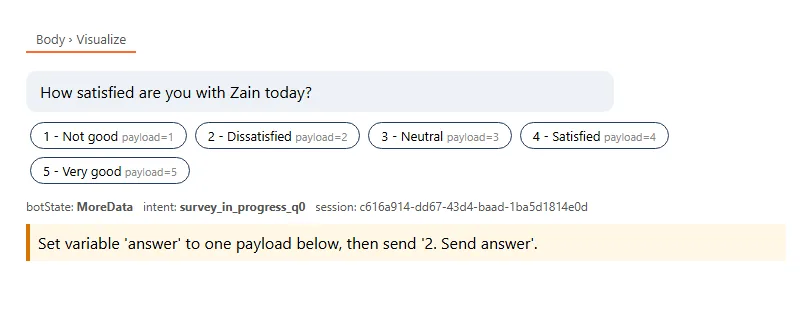
8. Values for the Genesys admin
| Genesys screen | Field | Value |
|---|---|---|
| Integrations → Genesys Bot Connector → Properties | Handle Utterance URI | https://dev.hivecfm.io/api/v1/management/bot-connector/turn |
| … → Credentials | credential field | x-api-key = HiveCFM key (write) |
| Architect → Inbound Message flow → Call Bot Connector | Bot / version | HiveCFM Survey Bot / 1.0 (after registration) |
| Session variables | surveyId (the value returned by selection, step 4), environmentId (required), agentId, channel, conversationId, contactId (the upserted userId value) | |
| Exit intents | survey_complete, survey_opted_out, survey_error |
Register the bot first. The Bot Name dropdown stays empty until the bot is registered by hand (runbook docs/genesys-bot-registration.md): copy the integration ID from the integration page URL, then in Admin → Developer Tools → API Explorer send the PUT below and expect 204 No Content. GET /bots cannot be reused as this body — see What GET /bots actually is.
{ "chatBots": [{
  "id": "hivecfm-survey-bot",
  "name": "HiveCFM Survey Bot",
  "versions": [{
    "version": "1.0",
    "supportedLanguages": ["en-us", "ar-sa"],
    "intents": [
      { "name": "survey_in_progress" }, { "name": "survey_complete" },
      { "name": "survey_opted_out" }, { "name": "survey_error" }
    ]
  }]
}]}
The runbook’s sample lists only en-us; ar-sa is added here for Arabic chats and has not yet been run against a live org.
The org already has an integration named hivecfm pointing at hivecfm.xcai.io. Do not repoint it; install a separate integration for dev.
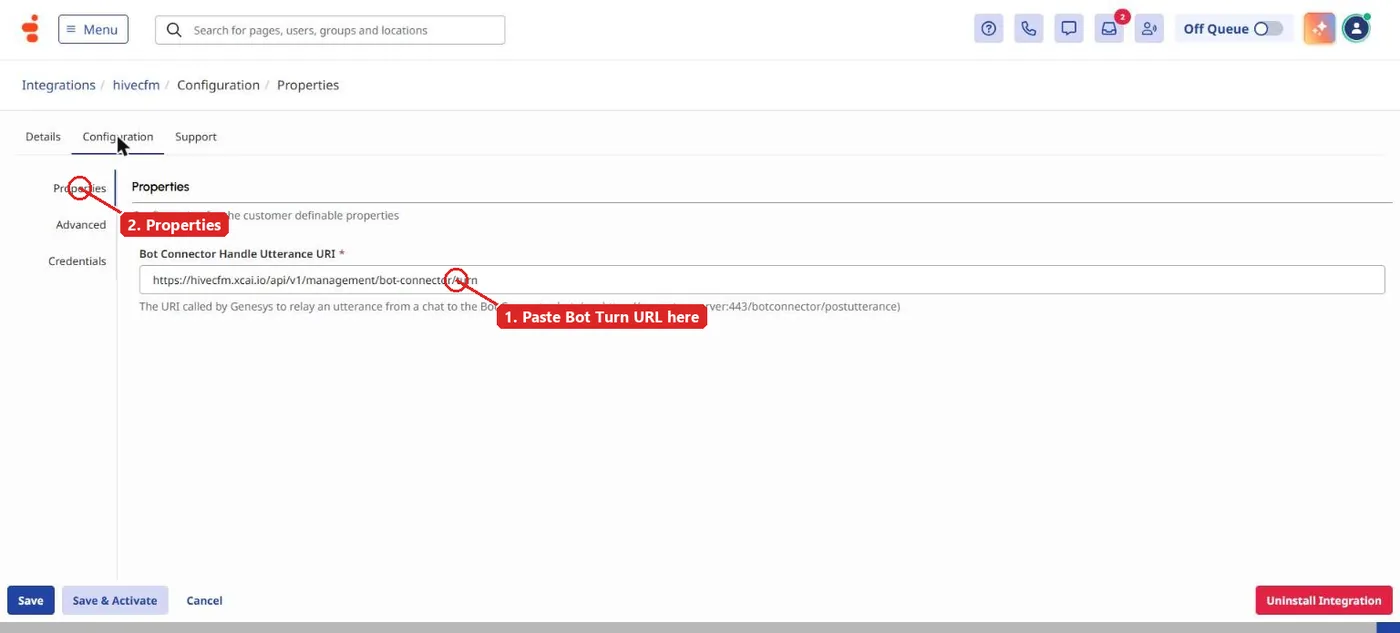
9. Check the responses
Survey → Responses. One row per finished chat, Status Completed, the answers, your hidden fields, and Source = genesys_bot_connector (from meta.source).
Known issues found while testing
| Issue | Effect | Workaround |
|---|---|---|
| Typing fast in Welcome/Ending card fields crashes the editor (ReactReactThe component-based UI library every HiveCFM frontend is written in. Components are TypeScript functions returning JSX. #185) | unsaved text lost | paste text, save often |
botSessionId: "" on a turn | HTTP 500 instead of 400 | always send a session id |
| Arabic block Button Label empty | Publish blocked | fill it under Show Block settings |
Reference
Everything below is verified against origin/development of hivecfm-core.
SurveyType has exactly three members (link, app, voice), and the bot connector reads none of them. Verified by absence:
git grep -n 'survey\.type\|survey\.status\|SurveyType\|SurveyStatus' \
  origin/development -- apps/web/app/api/v1/management/bot-connector/
# (no hits)
getSurvey itself is a bare findUnique on the id with no status or type predicate (lib/survey/service.ts:270-294), so the gate is not hiding one level down either. A link survey, an app survey and a paused survey all serve turns identically. The only survey-shape gate is isSupportedInChat (see Question rendering).
The upstream contract this implements is Genesys’ own Bot Connector customer API spec — the URL lib/types.ts cites. Read it there rather than here; this page documents only what HiveCFM’s side of that contract actually does, which in four places is not what its own doc comments say.
The subsystem is six files at origin/development, plus three test files:
| File | Lines |
|---|---|
bot-connector/turn/route.ts | 966 |
bot-connector/lib/question-formatter.ts | 375 |
bot-connector/lib/reply-text.ts | 169 |
bot-connector/lib/types.ts | 157 |
bot-connector/bots/route.ts | 58 |
bot-connector/lib/contact-lookup.ts | 34 |
The three test files cover question-formatter, reply-text and contact-lookup. There is no turn/route.test.ts — nothing exercises the 966-line handler or the shape of what it puts on the wire. That absence explains most of what follows.
The two endpoints
GET .../bot-connector/bots | POST .../bot-connector/turn | |
|---|---|---|
| Purpose | Return the bot catalog | Handle one customer utterance |
| Wrapper | withV1ApiWrapper | withV1ApiWrapper |
| Authentication | x-api-key header → authenticateRequest | identical |
| Authorization | none — the handler destructures authentication: _authentication and never reads it | hasPermission(authentication.environmentPermissions, environmentId, "POST") at turn/route.ts:432 and :684 |
| Permission that satisfies it | any valid key, any organization | write or manage on that specific environment |
Where environmentId comes from | n/a | the request body: parameters.environmentId |
| Audit row | none (no action/targetType passed) | action: "created", targetType: "response" (turn/route.ts:389-390) |
Both routes match /^\/api\/v\d+\/management\// in isManagementApiRoute (endpoint-validator.ts:28-38), so withV1ApiWrapper picks AuthenticationMethod.ApiKey and authenticateRequest reads the header x-api-key (app/api/v1/auth.ts:13). hasPermission maps "POST" → write via methodPermissionMap (api-keys/lib/utils.ts:5-11); a key holding only read on the environment is rejected.
How this differs from the IVR routes
Not by header — both paths read the same x-api-key, and both call the same hasPermission helper. The differences are namespace and scoping:
- Namespace. The bot connector is a management route (
ApiV1RouteTypeEnum.General,with-api-logging.ts:265), rate-limited perapiKeyId(:85). The IVR endpoints are client routes under/api/v1/client/<environmentId>/ivr/..., which additionally take an IP-based rate limit (:92-94, viaapplyClientRateLimittoapplyIPRateLimitat:59-67). - Where the tenant comes from. IVR carries
environmentIdin the URL path. The bot connector takes it from the request body,parameters.environmentId, and cross-checks it againstsurvey.environmentIdatturn/route.ts:453. - Which permission is demanded, and where.
checkIvrApiKeyAccesspasses the request’s real method through, soreadsuffices for the IVRGETroutes and every IVR route is gated. The bot connector gates onlyturn, and hard-codes"POST", sowriteon that environment is always required there — whilebotsis gated by nothing at all beyond a valid key.
See IVR Webhook Flow for that path’s auth callout, and Genesys IVR Setup for its setup procedure.
An authorization failure is off-contract
responses.unauthorizedResponse() returns HTTP 401 with body { code, message, details } (app/lib/api/response.ts:156-173). That body has no botState, no replymessages, no intent. Genesys therefore cannot read it as a bot turn: the Architect flow takes the generic Failure path, not the survey_error intent path. The same is true of the wrapper’s notAuthenticatedResponse for a missing or unknown key. Every other error in the handler is wrapped in a proper bot response — a malformed JSON body, a missing surveyId, a surveyId that resolves to nothing (404 at :441 and :710), a survey in the wrong environment, a survey with no chat-compatible elements (:470-481 and :619-631), and the catch-all 500 all return botState: "Failed" with intent: "survey_error". Only the two permission denials break the contract.
What GET /bots actually is
It returns one hard-coded bot and nothing else — id hivecfm-survey-bot, name HiveCFM Survey Bot, description “Post-conversation customer feedback survey”, one version 1.0 carrying four intents, each advertising the same nine session slots (contactId, serviceCode, agentId, agentName, channel, entityCode, conversationId, interactionType, language).
Whether Genesys ever calls it is not settled by the repo, and the two sources disagree:
- The route’s own JSDoc (
bots/route.ts:3-8) says “Genesys calls this to populate the Bot Name dropdown in the integration config” — a pull. docs/genesys-bot-registration.mdat the same ref says bots “must be registered via the Genesys Platform API”, by hand, throughPUT /api/v2/integrations/botconnector/{integrationId}/bots— a push, expecting 204 No Content, after which the bot appears in the Architect dropdown.
Nothing in the codebase proves Genesys polls this endpoint. Treat the route as a machine-readable statement of what HiveCFM claims to be, and the registration runbook as the procedure that actually makes the bot selectable. The GET /bots response body is not usable as the PUT body: the envelope key differs (bots vs chatBots), and versions[].supportedLanguages — required in the registration payload — is absent from the route’s output.
One survey, turn by turn
Step explanations.
1-2. Config time only, and only if Genesys pulls at all — see the contradiction above. No environment check runs here.
3-6. ZBotConnectorRequest.safeParse first; a parse failure returns 400 with botState: "Failed" (turn/route.ts:321-330). The session lookup at step 4 is what decides first-turn-versus-later: isFirstTurn = !existingSession (:348). There is no other signal — botState from the request is never read. Then the permission gate, then getSurvey, then the environment cross-check.
- The re-entry guard (
:513-573). If a prior unfinishedResponseexists for the same Genesys conversation on this survey and its frozenexpiredAtdeadline has passed, the handler refuses to start a fresh session and returnsbotState: "Complete"withintent: "survey_expired". The lookup filters on the JSON pathmeta.genesysConversationId, because that is where this flow stores the conversation id — the code comment at:515-518says so explicitly.
8-9. The Response row is created unfinished, with data pre-seeded from the hidden fields and meta.source = "genesys_bot_connector", then responseCreated goes to the same internal pipeline the browser and IVR paths use (see Survey Response Flow).
10-12. findNextChatElement is called with the literal block id "start", a sentinel resolveNextBlock special-cases into “the first block” (lib/survey-logic/engine.ts:651-674). Session state is written to RedisRedisIn-memory key-value store used for caching, sessions, and rate limiting. Runs on port 6380 locally., and the first question goes back with the intent suffixed _q0.
13-14. RedisRedisIn-memory key-value store used for caching, sessions, and rate limiting. Runs on port 6380 locally. is read first, before the in-process map. The comment at :77-79 gives the reason: reading local-first can replay stale state from another turn handled by this replica, “causing a reply for q2 to be validated against q0”.
15-16. OPT_OUT_KEYWORDS is an exact-match set on the trimmed, lower-cased utterance (:265-268): stop, quit, cancel, unsubscribe, opt out, optout, no thanks. It is checked before the survey is even fetched, and the reply text is hard-coded English — it is not resolved from any survey card.
17-18. See Invalid replies. The rejected reply is not stored as an answer; it becomes an audit_event row.
19-23. Answer recorded into session state, nextNext.jsReact framework used by HiveCFM Core. Handles routing, server rendering, and API routes in one bundle. block resolved through the logic engine, session written, then the partial save. Note the order: session state is committed before the database write, and a failed partial save is logged and swallowed (:846) unless it is a SurveySessionExpiredError, which ends the conversation with intent: "survey_expired".
24-28. completeSurvey deletes the session first, then marks the row finished and fires both responseUpdated and responseFinished.
The request contract
ZBotConnectorRequest (lib/types.ts:28-73). Ten top-level fields are declared; the handler reads five of them:
| Field | Zod | Read? | Notes |
|---|---|---|---|
botSessionId | z.string() — the only required field | yes | the session key, and the audit targetId until the response exists |
inputMessage.text | optional string | yes | free text |
inputMessage.type | optional string | yes | only the literal "Structured" opens the button branch |
inputMessage.content[].buttonResponse.payload | optional string | yes | button payload; .text is the fallback |
parameters | z.record(z.string(), z.string()).optional().default({}) | yes | carries surveyId and environmentId, plus everything else |
languageCode | optional, .default("en-US") | yes | split on -, first segment kept |
genesysConversationId | optional string | yes | re-entry key; stored in meta |
botState | z.string().default("") | no | validated then ignored — see the trap below |
botId, botVersion | optional strings | no | |
botSessionTimeout | optional number | no | |
chatBot.id, chatBot.name | optional strings | no |
SurveySurveyThe core HiveCFM object. A definition of questions, logic, and targeting — shown to respondents to collect feedback. identity comes from parameters, and only from there. handleFirstTurn reads body.parameters?.surveyId and body.parameters?.environmentId (:402-403); either one missing returns 400 with intent: "survey_error" and an explicit message. Everything else in parameters is dynamic pass-through: every non-empty value becomes a hidden field on the response (:489-495), and reporting surfaces only the keys the survey declares in hiddenFields.fieldIds, so unknown keys are inert rather than rejected.
How a button click arrives. extractUtterance (:239-261) checks inputMessage.type === "Structured" and a non-empty content array, then takes content[0].buttonResponse.payload, falling back to .buttonResponse.text. Only the first content item is examined. Anything else — including a Structured message with an empty content — falls through to inputMessage.text || "".
Language. body.languageCode?.split("-")[0] || "default" (:483, :722). With the zod default in play, a Genesys request that omits languageCode resolves to "en", not "default", and that "en" is what gets persisted as Response.language. Text lookup then tries i18nStr["en"], falls back to i18nStr["default"], and finally to the first value present (question-formatter.ts:22-27), so single-language surveys still render.
The response contract, and the trap
botState is a status, not serialized state. TBotState = "MoreData" | "Complete" | "Failed" (lib/types.ts:105). The file’s own comment block at :79-87 states the rule: “botState: ‘MoreData’ | ‘Complete’ | ‘Failed’ (NOT serialized session state) … Session state must be managed server-side (keyed by botSessionId).”
The wire field is lowercase replymessages. botResponse builds { botState, intent, confidence, ...extra } and then assigns the messages through a bracket index — resp["replymessages"] = msgs — at turn/route.ts:291, with the comment // Genesys Bot Connector v1 uses lowercase "replymessages" (not camelCase) on the line above. The TypeScript interface TBotConnectorResponse declares replyMessages with a capital M at lib/types.ts:109, and that interface is referenced nowhere in apps/web — git grep TBotConnectorResponse at the ref returns exactly one hit, its own declaration. The builder’s signature is Record<string, unknown> (:278-283).
An integrator who models a client on the interface will read replyMessages, get undefined, and see an empty bot. Model it on botResponse instead. Nothing catches this today: there is no test file for turn/route.ts.
Two message shapes travel in the same array. formatQuestionAsReply returns { type: "Structured", content: [...], text } — with reply.text assigned at runtime rather than in the literal, deliberately, “to prevent the Next.jsNext.jsReact framework used by HiveCFM Core. Handles routing, server rendering, and API routes in one bundle. minifier from stripping the text property” (question-formatter.ts:156-160). textReply returns { type: "text", text }, lowercase (turn/route.ts:273-276). Only two turns mix the two shapes: the invalid re-prompt, [textReply(invalidText), replyMsg] (:786), and the max-attempts advance, [...prefixReplies, replyMsg] (:869). The completion turn is all text — [...prefixReplies, textReply(thankYouMessage)] (:962).
What the bot advertises is not what it returns. Three divergences, all verified:
slotValuesis never set. The interface declares it (lib/types.ts:112) andbots/route.ts:15-25advertises nine session slots on all four intents, butgrep -n "slotValues" turn/route.tsreturns nothing. Architect slot outputs are always empty; the slots are documentation, not data.- Question metadata arrives at the top level.
getQuestionMetareturns{ questionTypeId, ratingType?, scaleType?, minScale?, maxScale? }(question-formatter.ts:330-362) andbotResponsespreads it into the root object via...extra. These are siblings ofbotState, not members ofslotValues. survey_in_progressis never returned verbatim. Every in-progress turn appends the linear index:`${BOT_INTENTS.SURVEY_IN_PROGRESS}_q${sessionState.currentQuestionIndex}`(turn/route.ts:868, first turn:657). The comment at:866-867gives the reason — Genesys fails a bot after four consecutive identical intents. Whether an Architect intent path prefix-matchessurvey_in_progressor requires an exact string is Genesys behavior this repo cannot answer; the terminal intents (survey_complete,survey_opted_out,survey_expired,survey_error) are always exact.
Where session state actually lives
RedisRedisIn-memory key-value store used for caching, sessions, and rate limiting. Runs on port 6380 locally., via the cache facade, keyed by botSessionId:
createCacheKey.custom("survey", botSessionId, "bot-session")createCacheKey.custom forwards to makeCacheKey, which joins the parts with : behind a mandatory fb: prefix (packages/cache/src/cache-keys.ts:58-62, packages/cache/src/utils/key.ts:27). The literal key is:
fb:survey:<botSessionId>:bot-sessiongetSession reads RedisRedisIn-memory key-value store used for caching, sessions, and rate limiting. Runs on port 6380 locally. first and only consults the in-process Map when the cache call itself fails (turn/route.ts:76-93). A cache hit refreshes the local map; a clean miss deletes the local entry, so stale local state cannot resurrect a finished session.
With no RedisRedisIn-memory key-value store used for caching, sessions, and rate limiting. Runs on port 6380 locally., the map is the whole store. An unset REDIS_URL produces a RedisConfigurationError (packages/cache/src/client.ts:12-18), the facade returns { ok: false, error } (apps/web/lib/cache/index.ts:48-57), and getSession falls through to getLocalSession after a warn. Correct on a single replica; broken across replicas, which is precisely the failure mode the Redis-first comment describes.
The 6-hour TTL is a hygiene cap, twice over. SESSION_TTL_MS = 6 * 60 * 60 * 1000 (:45) is both the local map’s expiry and the RedisRedisIn-memory key-value store used for caching, sessions, and rate limiting. Runs on port 6380 locally. TTL passed to cache.set (:97; packages/cache/src/service.ts:125 confirms the third argument is milliseconds). setSession runs on every advancing turn, so it is a six-hour idle window, not an absolute lifetime. A setInterval sweeps expired map entries every ten minutes (:112-120).
Real expiry enforcement is elsewhere and is not the same clock. It lives on Response.expiredAt, a frozen UTC deadline — and a bot row acquires it in two stages, because it is born as an invitation: data holds only the hidden fields, so countAnsweredQuestions returns 0.
- At creation, only the invitation window applies.
expiredAt = now + surveyExpirationCard.expireAfterHours,expirySource: "invitation"—createResponsebranches onansweredQuestionsCount === 0and callsresolveDeadlinewith the invitation candidate only (responses/lib/response.ts:135-142;resolveDeadlineitself atlib/survey/session-ttl.ts:115-128).Survey.sessionTtlMinutesis not consulted on that branch, so a survey with the Survey Expiration card disabled creates bot rows with no deadline at all. - On the first turn that records a real answer, the partial save converts the row:
createdAtis reset to that instant, andexpiredAtbecomes the earlier of the surviving invitation deadline andconversionNow + sessionTtlMinutes, withexpirySourcenaming the winner (lib/response/service.ts:596,:622-637).
getSessionExpiry then consults nothing but that stored column: a row with no deadline never expires, and later survey edits do not move an existing row’s deadline (lib/survey/session-ttl.ts:154-165). The rejection is a SurveySessionExpiredError thrown by updateResponse before the write (lib/response/service.ts:545-558), reached from the handler through updateResponseWithQuotaEvaluation — that is what the two expiry catches in turn/route.ts are catching. Response.expirySource drives which card’s copy the customer sees (reply-text.ts:79).
Which produces one gap worth knowing: if a conversation idles past six hours, the session key is gone, the nextNext.jsReact framework used by HiveCFM Core. Handles routing, server rendering, and API routes in one bundle. turn is treated as a first turn, and the re-entry guard only refuses when the prior row is expired (:547). Two ordinary configurations defeat it. A survey with the SurveySurveyThe core HiveCFM object. A definition of questions, logic, and targeting — shown to respondents to collect feedback. Expiration card off leaves an abandoned bot row at expiredAt = NULL — never expired, so never refused. And the guard is skipped outright when neither body.genesysConversationId nor parameters.conversationId carries a value (:521-522): no key, no lookup, no refusal. Either way a second Response row is created for the same Genesys conversation. Whether the turn gets that far depends on whether Genesys still sends parameters; without surveyId it 400s with survey_error instead.
Navigation and skip logic
resolveNextBlock from @/lib/survey-logic/engine drives every hop — the same engine the browser survey runner uses, so block logic, calculated variables, jumpToBlock and logicFallback all behave identically over chat. findNextChatElement (turn/route.ts:155-224) loops it, skipping blocks with no chat-supported element, capped at MAX_BLOCK_HOPS = 64 as a guard against logic loops (:147); exceeding the cap logs a warning and ends the survey.
TBotSessionState (lib/types.ts:117-147):
| Field | Role |
|---|---|
responseId | the Response row being filled in |
surveyId, environmentId | re-checked for permission on every later turn (:684) |
currentBlockId | the source of truth for position. Optional in the type only so pre-rollout sessions can fall back |
currentQuestionIndex | linear counter, 0-based. Its only live use is the _q<N> intent suffix |
questionIds | every chat-supported element id in document order, captured on the first turn, kept “so we can still expose a linear progress counter” |
answers | keyed by element id; doubles as the responseData input to the logic engine |
hiddenFields | every non-empty parameters entry, passed to the engine so logic conditions can read them |
variables | calculated variables accumulated across turns |
genesysConversationId | body.genesysConversationId or parameters.conversationId |
invalidAttempts | per-element invalid-reply counter |
On a later turn the handler finds the block by currentBlockId and takes its first chat-supported element; only if that fails does it fall back to questionIds[currentQuestionIndex] and back-resolve the block through findBlockIdForElement (:727-739). If neither resolves, the survey is completed rather than erroring.
A block with two answerable elements loses all but the first. ZSurveyBlock.elements is an array with .min(1) and no maximum (packages/types/surveys/blocks.ts:124), so multi-element blocks are legal. But both places the handler picks an element use elements.find((el) => isSupportedInChat(el.type)) — :198 when walking forward, :731 when scoring the current reply. Nothing indexes into a block’s elements or keeps a within-block cursor. The header comment at :133-137 promises the opposite: “if a block contains multiple chat-supported elements we surface them in order, jumping to the nextNext.jsReact framework used by HiveCFM Core. Handles routing, server rendering, and API routes in one bundle. block (per logic) only after the block’s last element is answered.” The code wins. Elements 2..n of a multi-element block are silently never asked over chat, while questionIds still lists them — :639 captures every chat-supported element in the survey — so its length overstates how many questions the bot will actually ask. That count never reaches Genesys: chatQuestions.length appears only in the :662 log line.
Question rendering and answer parsing
isSupportedInChat is a denylist of four of the fifteen TSurveyElementTypeEnum members (question-formatter.ts:367-375): fileUpload, pictureSelection, cal, matrix. Everything else is “supported” — including types the formatter has no case for.
An unsupported type is skipped, not rejected: findNextChatElement passes over it while walking, and if a whole survey has no supported element the first turn returns 400 with intent: "survey_error" and the message “This survey has no chat-compatible questions” (:470-481). A supported type with no switch case falls into default (question-formatter.ts:151-153) and renders as the headline alone, with no buttons — the customer sees a question and has to guess the answer format.
| Element type | Rendered as | parseAnswer accepts |
|---|---|---|
rating | one QuickReply per point, payload String(i + 1); label is the configured visual (number / ★ / smiley), with captions only when showAnswerLabels is on; reverseOrder flips display order while payloads stay put | first -?\d+ in the reply; else star count for scale: "star", else a leading smiley face for scale: "smiley"; else the raw trimmed string |
nps | one QuickReply per valid value from getNPSOptionValues, sentiment emoji when colour coding is on, endpoint captions appended to min/max | first -?\d+; else raw string |
multipleChoiceSingle | one QuickReply per choice, text = label, payload = choice id | choice id, then case-insensitive label match, then 1-based index. Returns the label, not the id |
multipleChoiceMulti | one QuickReply per choice | comma-split, each part matched id → label → itself. Returns an array of labels |
cta | the configured buttonLabel, or Continue when it is unset (payload clicked), plus a dismiss button when dismissButtonLabel is set (payload dismissed) | the trimmed reply lower-cased equal to dismissed; everything else becomes "clicked" |
consent | hard-coded Yes / No buttons, payloads accepted / dismissed, English regardless of languageCode | yes, y, accepted, agree, 1 → "accepted"; everything else → "dismissed" |
ranking | no buttons; choice labels are appended into the headline text with “Please rank them by typing them in order, separated by commas.” | comma-split into a string array, unvalidated |
openText, date, address, contactInfo | headline only, free text | trimmed string |
getText runs every label and headline through htmlToPlainText (:22-27), so rich-text headlines arrive as plain chat text.
Invalid replies and the max-attempts cap
Validation is opt-in per survey: the gate is survey.invalidResponseCard?.enabled && !validateAnswer(...) (turn/route.ts:752-753).
validateAnswer (question-formatter.ts:263-324) derives the valid set from the quick-reply payloads it just rendered, by calling formatQuestionAsReply and reading the content back — so the valid set can never drift from what the customer was shown. A reply passes if it is an exact payload, an echoed button label (case-insensitive), a contained numeric that is one of the payloads ("🟢 9", "9 - Extremely likely"), a star/smiley visual that maps to a payload, or — for multiple choice — a strict 1-based index. For multipleChoiceMulti, every comma-separated part must pass and the list must be non-empty.
It only covers four types. The first four lines of the function return true for anything that is not rating, nps, multipleChoiceSingle or multipleChoiceMulti (:264-268). No configuration makes the invalid-response card fire on openText, date, cta, consent, ranking, address or contactInfo. Combined with the parser’s fallbacks, that means a mistyped consent reply ("yse") is recorded as "dismissed", and any non-dismissed text on a CTA is recorded as "clicked" — silently, as real answers.
When a reply is invalid:
invalidAttempts[element.id]is incremented, in session state, so the counter survives across turns and replicas.logInvalidResponseAttemptwrites an audit row —action: "validationFailed",targetType: "response",targetId= the response id,targetName= the survey name, actor"Survey response validator", with a human sentence inerror_messagenaming the question headline, the truncated reply and the attempt count (modules/ee/audit-logs/lib/invalid-response.ts:51-101). It never throws, and no-ops when audit logging is off.exhausted = maxAttempts > 0 && attempts >= maxAttempts(:760). The cap issurvey.invalidResponseCard?.maxAttempts ?? 0, and 0 means unlimited. The column’s schema default is{"enabled": false}with nomaxAttemptskey at all, so a card enabled without explicitly setting the cap re-asks forever. HiveCFM imposes no stop of its own on that loop; any stop has to come from the Genesys side, which is outside what this repo can state.- Not exhausted → the session is saved and the turn returns two messages:
resolveInvalidResponseMessage(survey, language)followed by the same element re-rendered, stillbotState: "MoreData", still the current_q<N>intent — a re-prompt counts as in-progress (:777-791). - Exhausted →
resolveMaxAttemptsReachedMessage(survey, language)is queued asprefixReplies, the per-element counter is deleted, and navigation proceeds without storing an answer (:796-797). The element is left unanswered and does not count towardanswered_questions_count. The prefix message rides along on the next question’s turn, or on the completion turn if that was the last element.
Both messages resolve from the invalid-response card’s note + description (joined with a single space) and maxAttemptsReachedMessage respectively, per languageCode with a default fallback, and fall back to hard-coded English when the card is empty (reply-text.ts:106-130).
Intents
BOT_INTENTS defines five (lib/types.ts:151-157); bots/route.ts advertises four.
| Intent | In BOT_INTENTS | Advertised by /bots | Returned by the handler |
|---|---|---|---|
survey_in_progress | yes | yes | always suffixed _q<N>, never bare |
survey_complete | yes | yes | yes — the success exit of completeSurvey (:962) |
survey_opted_out | yes | yes | yes (:697) |
survey_error | yes | yes | yes — parse failure, missing parameter, wrong environment, no chat elements, catch-all 500 |
survey_expired | yes | no | yes — three sites: the re-entry guard (:567), an expiry hit during partial save (:840), and one during the final save (:927) |
survey_expired is a real terminal outcome that the discovery endpoint does not declare — and the registration runbook’s PUT payload lists only the same four, so it is not registered on the Genesys side either. An Architect flow therefore has no survey_expired intent path to branch on, even though HiveCFM will emit it with botState: "Complete". What Genesys does with an unregistered intent name is Genesys behavior this repo cannot settle; what it will not do is take a branch that was never configured. Route expiry through the survey_complete path or add the intent to the registration payload.
Contact resolution
lookupContactByIdentifier(environmentId, contactId) (lib/contact-lookup.ts:5-34) is called on the first turn only, and only when parameters.contactId is non-empty (turn/route.ts:500-511). The identifier is whatever string the Architect flow put in that slot. Resolution order:
- A
ContactAttributerow whose key isuserIdin this environment and whosevalueequals the identifier —orderBy: { updatedAt: "desc" }, because a channel that upserts the contact right before requesting the link bumpsContactAttribute.updated_atwhileContact.updated_atis untouched on the update path. - Failing that, a
Contactwhoseidequals the identifier, in this environment. - No match →
null, a warn is logged (“contact not found, response will be anonymous”), and the response is created with no contact link.
Branch 2 does not actually link the contact. The handler sets contactUserId = hiddenFields.contactId — the raw input string, not contact.id — and passes it as userId to createResponseWithQuotaEvaluation (:503, :586). createResponse then re-resolves it with getContactByUserId(environmentId, userId), which matches only the userId attribute (responses/lib/contact.ts:14-35), and Response.contactId is connected only if that returns a contact (api/v1/lib/utils.ts:33-40). So an Architect flow that passes a raw HiveCFM contact cuid gets the reassuring log line “Bot connector: contact identified” and an anonymous response row. Only branch 1 — a userId attribute value — produces a linked contact.
There is a second, quieter divergence between the two lookups: contact-lookup.ts breaks ties on ContactAttribute.updatedAt DESC, while getContactByUserId is a bare findFirst with no orderBy. Among duplicate contacts sharing a userId, the two can pick different rows.
"Contact" itself has only four columns — id, created_at, updated_at, "environmentId" — everything else is EAV in "ContactAttribute". Verified against the reference schema:
echo '\d "Contact"' | docker exec -i hivecfm-postgres-t3060 psql -U postgres -d devhub_refWhat a bot response looks like in the database
Nothing distinguishes a bot response structurally — it is an ordinary Response row. The marker is meta.source:
SELECT r.id, r.created_at, r.finished, r.answered_questions_count,
       r.language,
       r.meta->>'genesysConversationId' AS genesys_conversation_id,
       r.meta->>'agentId'               AS genesys_agent_id,
       r.meta->>'channel'               AS genesys_channel,
       r.data
FROM "Response" r
JOIN "Survey" s ON s.id = r."surveyId"
WHERE s."environmentId" = 'YOUR_ENVIRONMENT_ID'   -- mandatory tenant filter
  AND r.meta->>'source' = 'genesys_bot_connector'
ORDER BY r.created_at DESC
LIMIT 50;
EXPLAIN-verified against devhub_ref (the exact origin/development schema): index scan on Survey_environmentId_updated_at_idx, nested loop into Response, no sequential scan. It was not run successfully against the local hivecfm database, and cannot be: that database is migration-era and has no answered_questions_count column, so the query as written aborts with ERROR: column r.answered_questions_count does not exist. Drop that one projected column and the remaining JOIN + meta->> shape does execute there — returning no bot rows, because meta->>'source' is ist-old on 1497 of its 1498 Response rows and null on the last.
The tenant filter is not optional. RLS cannot be relied on: an unset app.current_tenant GUC makes every tenant’s rows visible, and superusers bypass RLS entirely. See Read this first.
Three traps specific to bot rows:
genesys_conversation_idis empty. The column exists and is indexed (@@index([genesysConversationId])on theResponsemodel), but this flow writes the conversation id intometainstead (turn/route.ts:590, comment:515-518). A query against the column finds nothing for bot responses. The handler’s own re-entry guard uses the JSON path, which cannot use that index.answered_questions_count = 0with non-emptydata. The first turn seedsdatawith the hidden fields (:584), andcountAnsweredQuestionscounts only keys that match a survey element id (lib/response/utils.ts:50-65). An abandoned bot session is therefore an invitation row with populateddata— filter onanswered_questions_count > 0to count real responses.datais keyed by element cuid. There is no stable key across surveys; resolve the headline by unnestingSurvey.blocks.
Invalid replies are not in Response at all — they are audit rows, and audit_event has no environmentId, so the tenant filter is organization_id (which is also the value the RLS GUC carries). audit_event is not among the tables the RLS scripts policy, so the explicit filter is the only thing scoping this query:
SELECT a.created_at, a.target_id AS response_id, a.target_name AS survey_name, a.error_message
FROM audit_event a
WHERE a.organization_id = 'YOUR_ORGANIZATION_ID'
  AND a.action = 'validationFailed'
  AND a.target_type = 'response'
ORDER BY a.created_at DESC
LIMIT 50;
EXPLAIN-verified against devhub_ref: index scan on audit_event_organization_id_created_at_idx.
Fuller recipes, including per-element answer resolution and the Genesys column-vs-meta split: Genesys and IVR queries.
Where the prose docs drifted
docs/genesys-bot-connector-implementation.md predates the handler and documents an earlier contract. Every row below is a live contradiction at the same ref; the code wins.
| The doc says | The code does |
|---|---|
utterance (string) on the request | inputMessage.text, or inputMessage.content[].buttonResponse.payload |
inputParameters carries surveyId / environmentId | parameters |
botState is serialized session state, round-tripped through Genesys | botState is a status enum; the request’s value is never read, and state lives in RedisRedisIn-memory key-value store used for caching, sessions, and rate limiting. Runs on port 6380 locally. |
ResponseResponseOne person's set of answers to a Survey. The atomic unit of data HiveCFM analyses. field replyMessages | wire field replymessages |
intent is an object { name, confidence, slots } | intent is a plain string; confidence is a top-level 1.0; slotValues is never set |
| Errors table lists “Invalid botState → 400” | no such path exists — there is nothing to deserialize |
First turn is detected by an empty botState | detected by a session-store miss on botSessionId |
Its Genesys-side procedure — install the Bot Connector integration, set the Bot Connector URI to the turn route, add a credential field named x-api-key, activate, then wire session variables and intent paths in the “Call Bot Connector” action — is still the right shape and matches the auth model above. Do not carry its JSON examples across.
docs/genesys-web-messaging-test.md:13 and docs/genesys-messenger-test.html:35 each carry the same real Messenger deployment id in plain text, and the .html wires it straight into a live Genesys bootstrap. Treat it as a committed secret to rotate, not as a working test fixture. Its value is deliberately not reproduced here.
One operational note
Every turn is logged at WARN, including rawBody: JSON.stringify(jsonInput) and the extracted utterance (turn/route.ts:350-360), with two more WARN lines carrying the full response body (:661, :871).
Those lines are emitted by default in production. getLogLevel in packages/logger/src/logger.ts:7-19 starts at info, sets warn when NODE_ENV is production or unset, and only a valid LOG_LEVEL env var overrides it. So the shipped default keeps WARN on, and customer free-text answers land in production logs unless someone raises LOG_LEVEL to error. These are not debug lines that a normal deployment drops — suppressing them takes an explicit env change, or a change to the handler.
Where to look in the code
hivecfm-core/apps/web/app/api/v1/management/bot-connector/turn/route.ts— the whole conversation: session store, block walking, utterance extraction, both turn handlers,completeSurvey.hivecfm-core/apps/web/app/api/v1/management/bot-connector/bots/route.ts— the hard-coded bot catalog and the nine advertised session slots.hivecfm-core/apps/web/app/api/v1/management/bot-connector/lib/types.ts—ZBotConnectorRequest,TBotState,TBotConnectorResponse(the interface that does not describe the wire),TBotSessionState,BOT_INTENTS.hivecfm-core/apps/web/app/api/v1/management/bot-connector/lib/question-formatter.ts—formatQuestionAsReply,parseAnswer,validateAnswer,getQuestionMeta,isSupportedInChat.hivecfm-core/apps/web/app/api/v1/management/bot-connector/lib/reply-text.ts— completion, expiry, invalid-response and max-attempts message resolution.hivecfm-core/apps/web/app/api/v1/management/bot-connector/lib/contact-lookup.ts—lookupContactByIdentifier.hivecfm-core/apps/web/app/lib/api/with-api-logging.ts—withV1ApiWrapper: route classification, authentication, rate limiting, audit capture.hivecfm-core/apps/web/app/api/v1/auth.ts—authenticateRequest, which readsx-api-key.hivecfm-core/apps/web/app/middleware/endpoint-validator.ts—isManagementApiRoutevsisIvrApiRoute.hivecfm-core/apps/web/modules/organization/settings/api-keys/lib/utils.ts—hasPermissionand the method → permission map.hivecfm-core/apps/web/lib/survey-logic/engine.ts—resolveNextBlockand the"start"sentinel.hivecfm-core/apps/web/lib/survey/session-ttl.ts— the two expiry windows andResponse.expiredAt.hivecfm-core/apps/web/lib/response/utils.ts—countAnsweredQuestions, the response-vs-invitation rule.hivecfm-core/apps/web/app/api/v1/management/responses/lib/response.tsandlib/contact.ts— whereuserIdbecomesResponse.contactId, or does not.hivecfm-core/apps/web/modules/ee/audit-logs/lib/invalid-response.ts— thevalidationFailedaudit row.hivecfm-core/packages/cache/src/cache-keys.ts,packages/cache/src/utils/key.ts,packages/cache/src/client.ts— thefb:key format and theREDIS_URLrequirement.hivecfm-core/packages/types/surveys/blocks.ts,packages/types/surveys/elements.ts— the block/element model and all fifteen element types.hivecfm-core/docs/genesys-bot-registration.md— thePUT /api/v2/integrations/botconnector/{integrationId}/botsregistration payload.hivecfm-core/docs/genesys-bot-connector-implementation.md,docs/genesys-web-messaging-test.md— drifted; read for Genesys-side procedure only.
Read next
- Integrations overview — every door into and out of HiveCFM, and who authenticates whom.
- IVR Webhook Flow — the other Genesys path, and the auth model it really has.
- Genesys IVR Setup — the setup procedure for the voice channel.
- Genesys and IVR queries — SQL for both Genesys paths.